

![Download D Light M100 FRP and DA File (Scatter) [Free]](https://bypassfrpfiles.com/wp-content/uploads/2024/04/Dlight-M100.jpg)
D Light M100 FRP and DA File helps you to bypass FRP Google Account verification lock in just one click with SP tool. FRP is an inbuilt data protection feature for that protects Android users’ personal data and Privacy during thefts. So if you factory reset the phone then you have to use last used Google account or it will be stuck at Google verification lock
In the following topics, we will provide you the links to Download FRP File, the zip file includes FRP File, USB driver & how-to-use guide, etc. Also, you can use FRP bypass tool, FRP Bypass APK to overcome the situation.
Download D Light M100 DA and FRP Reset File
| File Name: | D Light_M100_Unlock_File.zip |
| Size: | 500KB |
| Type: | .zip |
| PASSWORD | BYPASSFRPFILES.COM |
| Flash Tool: | SP Flash Tool |
| USB Driver: | MTK USB Driver |
How to Use
- Download D Light M100 DA and Unlock file with SP Flash tool to your computer.
- Extract the files.
![D Light M100 FRP and DA File (Scatter MTK) [Free] Spark 3 Pro](https://bypassfrpfiles.com/wp-content/uploads/2024/04/Redmi-FRP-10-1.webp)
- Open the Flash tool folder & Run SP Flash tool.exe.

- Click on Choose from Download-Agent file Tab and select the D Light M100 DA FILE.bin file.
- Tap Open.

- Click on Choose from Scatter-Loading File Tab and select the MTK_Android_scatter.txt file.
- Tap Open.
- Now Uncheck the Preloader Partition.

- Goto Format => Select Manual Format Flash.

- Copy and Paste the below FRP Address into the SP flash tool

FRP Erase Address
-------------------------------------------
linear_start_addr: 0x18000000
partition_size: 0x100000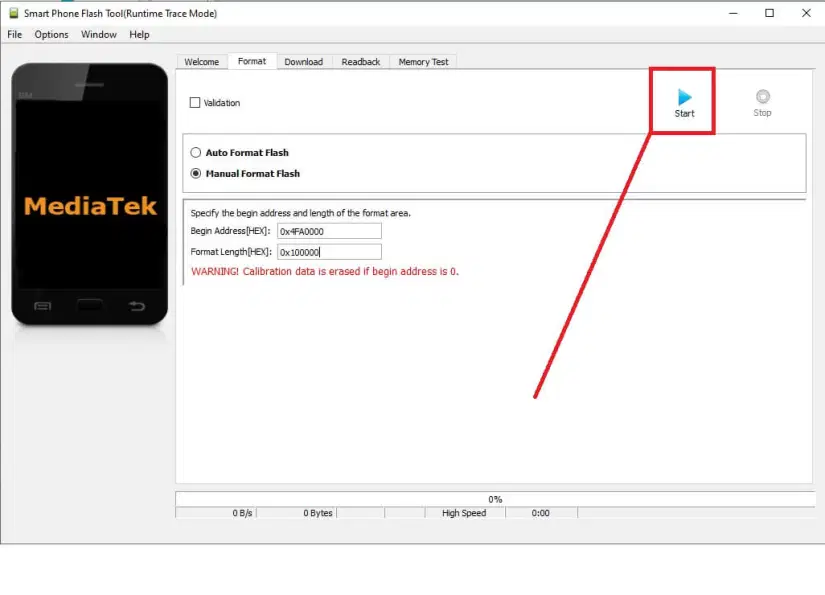
- Click START.
- Then Power Off your phone.
- Connect your device to computer via USB cable.

- Open Device Manager => Check the COMPORT Number.
- Select the COMPORT number (In my case I have COM9).
- The unlocking process will begin.
- It will take some time to finish.

- Once finished, disconnect and Power On your D Light M100.
- Setup all initial steps.
- That’s it.
Read Me
Caution: This method is for device owner and only for educational purposes, meaning trying this method on a stolen device is a serious crime, it may lead you to the jail.
Warning: BypassFRPFiles.com not responsible for any damage on your device please try this at your own risk.
Post a Comment
0 Comments